by The Power Table Team
Has this ever happened to you?
You’re in the middle of folding laundry, driving to pick up groceries, or just walking the dog, and out of nowhere, a genuinely good idea shows up.
A line for a caption. The perfect way to explain your offer. A fix for something that’s been bugging you about your onboarding process.
You tell yourself you’ll remember it. You always tell yourself that.
Then thirty minutes go by. You’re back at your desk, and the idea is gone. Not fuzzy, not half remembered. Just gone, like it was never there at all.
If your brain moves faster than your hands, and you’d rather talk something out than sit down and type it, this one’s for you.
If you’re a founder who thinks better out loud, a coach who’s constantly narrating ideas to herself between calls, or someone who’s simply tired of losing good thoughts to bad timing, keep reading to learn how we use Wispr Flow and it’s changed the game for The Power Table team completely.

What’s Actually Causing You to Lose Precious Work Time (Even If You Already “Have a System”)
You’ve got too many notes saved “for later” on your phone.
The time blocking strategy your coach gave you just didn’t work.
Or maybe, you already know you think better out loud, and you’ve already tried to solve this. Maybe you use the built-in voice memo app on your phone. Maybe you’ve got a folder of recordings you keep meaning to go back to.
Recording your ideas is not the problem. It’s what happens after you hit the stop button. The recording just sits there, unpolished, untouched, waiting for you to eventually sit down and manually turn it into something usable.
At the end of the day, when you’re already tired, that editing work becomes its own manual labor, and that’s on top of everything else you were trying to avoid by recording in the first place. So the voice memo pile grows, and most of it never turns into anything.
Wispr Flow does the work of turning those messy voice notes into something usable for you. And it makes it so incredibly easy too that you don’t need to spend a lot of time learning it.
When Your Brain Moves Faster Than Your Hands
Wispr Flow is a voice dictation tool, but calling it just that undersells what it does.
You speak, and instead of getting a raw, messy transcript full of filler words and half finished sentences, you get something already cleaned up.
Punctuated. Organized. Written in a tone that matches what you were trying to say, not just a literal record of every “um” and pause along the way.
That distinction matters more than it sounds like it should. A transcript is something you still have to work on. A polished text is something you can send.
Teaching It Your Business’s Language
Here’s why we love Wispr Flow. The tool can learn how you talk.
Picture this. A program exists somewhere that learns your business’s specific language, so that every email going forward already sounds like you, in your tone, your phrasing, your style, without you rewriting it from scratch every single time.
That used to sound like a nice idea with no real product behind it. Wispr Flow does it.
Here’s what that looks like in practice:
- It learns your business’s language. Program names, client names, industry terms, the specific phrases you use often. Once it knows them, a simple voice note turns into a finished email that already sounds like you wrote it carefully, not like a robot filled in the blanks.
- Snippets save you from typing the same thing twice. Say a specific keyword or phrase out loud, and Wispr Flow instantly pulls up the full email template you already saved under that name. No searching through old emails to find the one you wrote last time.
- Your voice notes come out already polished. Whatever you say gets transformed into a clean, finished format immediately, not a rough draft you still have to sit down and fix later.
One of the most genuinely convenient parts of this is building your own text templates for the things you write constantly. An intro email. An onboarding sequence. A follow up you send after every single call.
Once it’s saved, you can pull it up anywhere with nothing more than a short voice note.
Here’s how simple it is to set one up:
- Open Wispr Flow and go to Snippets. This is where every saved template lives.
- Click Add New. This starts a fresh template.
- Write your template, and give it a name you’ll remember. That name is what you’ll say out loud later to trigger it, so keep it short and obvious.
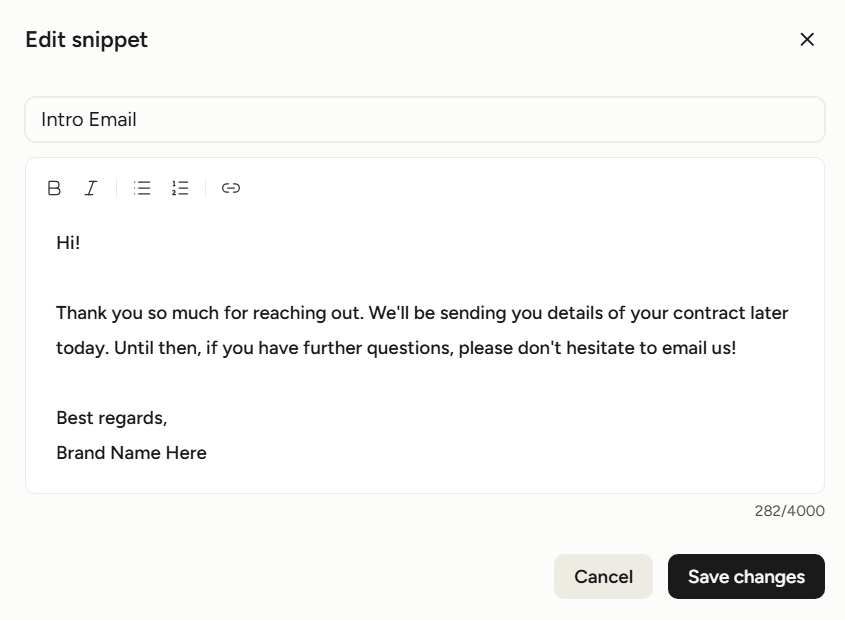
- Save it, and you’re done. From here on, calling up that template takes seconds instead of minutes.
Once your snippets are saved, using one is just as simple:
- Open a blank notepad, or use the built-in scratchpad inside Wispr Flow.
- Hold Ctrl plus the Windows key on Windows, or the Fn key on Mac, and say the snippet’s title out loud. The full template appears instantly, right where your cursor is.
This is especially handy the moment you need to send something to a client and don’t have the exact wording saved anywhere else.
A couple of held keys, a few spoken words, and the whole message appears on the page. For anyone who writes and sends emails every single day, that adds up to a genuinely meaningful amount of time back.
It Also Sits In on Your Meetings
Wispr Flow doesn’t stop at emails. You can connect your Google Calendar or Zoom, which keeps you accurately reminded of what’s coming up next on your schedule. But the real value shows up once the meeting starts.
During a live call, Wispr Flow can take notes in real time, right alongside the conversation.
Here’s what that looks like:
- Click the Notetaker feature on your dashboard. Wispr Flow immediately starts transcribing the meeting as it happens, generating a running summary while the conversation is still going.
- Ask it questions in real time during the meeting. If someone catches you off guard mid call and you need a detail from ten minutes earlier, you can ask Wispr Flow directly instead of frantically scrolling back through your own notes.
- Use it even without a formal meeting. If you’re someone who genuinely thinks better out loud, you can narrate your own thoughts and have them transcribed and organized into a clean, readable format on the spot. Not a wall of run-on sentences stitched together, but something you can glance at later and understand. It becomes a fully organized text format that you can use as your guide for your next steps into achieving those goals.
The Difference Between Attending and Being There
Normally, you’re stuck choosing between two things during a meeting.
Either you’re fully present in the conversation and hoping you remember the important parts afterward, or you’re heads down taking notes and only half listening to what’s being said.
Wispr Flow removes that trade off entirely. You get to be in the conversation, asking questions, reacting to what’s said, building the relationship, while the notes take care of themselves in the background. Nothing gets missed because you were too busy writing to listen.
When Everything Works Together
Put all of these pieces together, and Wispr Flow starts to feel less like a single app and more like a personalized digital notebook that happens to do a lot more than any notebook ever could.
It remembers your brand’s tone, language, and style. It takes your raw, rambling voice notes and turns them into something that already sounds like your business. It makes sure a meeting detail never quietly disappears the way it used to.
If you’re the kind of business owner or coach who genuinely cares about not missing the small stuff, this is a tool built with exactly that instinct in mind.
Why This Matters Especially for Business Owners
We know that most of your day is already spoken out loud before it’s ever written down.
Client calls, discovery conversations, voice memos to yourself in between sessions, ideas that show up mid workout or mid drive. Your business runs on talking, even when the deliverable at the end is a written email, a proposal, or a set of notes for a client.
That makes the difference between speaking and writing a bigger deal for you than it is for most businesses.
Every time an idea gets lost because you couldn’t type fast enough, or every time a meeting detail slips because you were focused on coaching instead of scribbling notes, that’s a small tax on a business that depends entirely on your attention and your voice.
This is an infrastructure for how you work, built around the reality that your best thinking usually doesn’t start on a keyboard.
The Real Payoff
Building a business already takes up more hours than most people expect. The idea here isn’t to add one more thing to your plate. It’s to remove the friction between having a good thought and doing something with it.
Wispr Flow gives you back the ideas that used to slip away in the middle of a busy day, the meeting details you used to lose while trying to keep up, and the hours you used to spend cleaning up your own voice notes before they were usable. If you’re someone whose mind runs faster than your hands can keep up with, this is the kind of tool that finally lets your business move at the speed you think.