by The Power Table Team
Full disclosure before we go any further: The Power Table is an Adobe Acrobat Ambassador, which means we partner with Adobe and may receive compensation for sharing their tools. However, everything below is a genuine account of how we actually use it, not a sponsored script.

Most tools get used exactly once for the thing you bought them for.
You get a CRM to manage clients.
You get a scheduler to book calls.
The tool does its one job, and you move on to another tool every time you have a new problem to solve.
PDF Spaces inside of Adobe Acrobat Studio hasn’t worked that way for us. Every time we think we’ve found its ceiling, it turns out to have another use we hadn’t planned for.
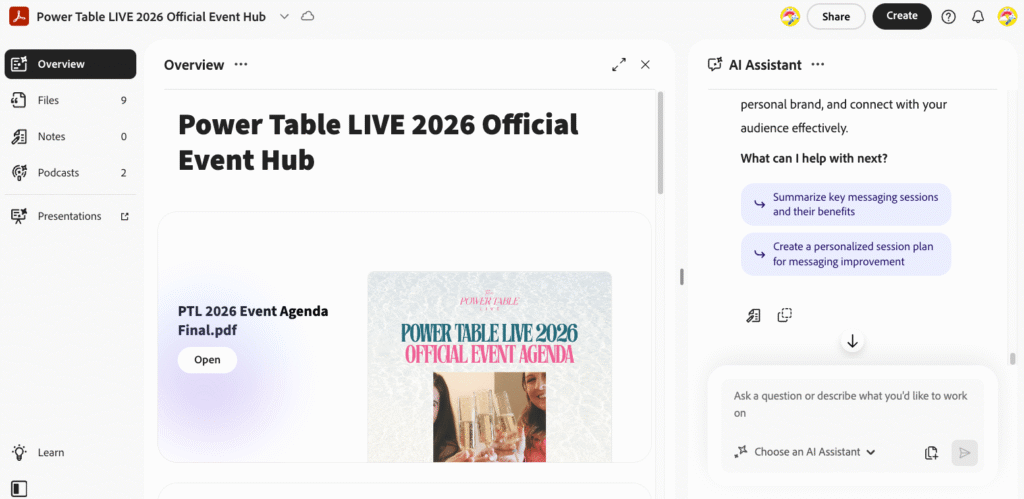
We first mentioned it in our article on “How to Host Your First (or Next) Event, and Actually Make Money From It,” where it served as the official event guide hub for Power Table LIVE 2026 attendees.
That was one example out of several of how we use this easy tool to organize ideas and documents, so we wanted to share with you three more ways we regularly use PDF Spaces!
If you’re a business coach juggling contracts, brand materials, and/or live event logistics across five different tools, this is worth reading closely, because a lot of that juggling might not need to happen at all.
What a PDF Space actually is
Before diving into how we’ve used it, it’s worth refreshing what a PDF Space actually does, since the name undersells it.
A PDF Space is an AI powered hub inside Acrobat that lets you upload up to 100 files into one collaborative space. It isn’t limited to PDFs despite the name. You can drop in documents, transcripts, spreadsheets, and a mix of file types all into the same space, and the AI handles the bulk of organizing it.
Once your files are uploaded, a built-in AI Assistant can answer questions about anything inside that space. Ask it to summarize a document, pull a specific detail out of a long contract, or suggest a next step based on everything you’ve uploaded, and it responds instantly instead of requiring you to dig through file after file yourself.
PDF Spaces can also generate new material from what’s already there. Raw notes or transcripts can turn into a clean document, a chart, a set of talking points, whatever the next step actually calls for.
And sharing a space doesn’t require the other person to have an Adobe account at all.
The overview page is fully customizable, so you can add a written or audio summary explaining the project’s background and goals before anyone even opens a single file.
That’s the general shape of the tool. Here’s what it’s actually done for us.
It’s also worth pointing out what this replaces, because that’s where the real value shows up.
Before consolidating into a single space, a project like this typically meant a folder of loose documents in one place, a separate thread of email clarifications about what those documents actually meant, and a person on the team whose job partly involved remembering where everything lived and answering the same questions about it more than once. None of that is unusual. It’s just quietly inefficient in a way most businesses never stop to notice, because it’s the water everyone’s swimming in.
Moreover, Acrobat’s recent update that’s worth noting is: you can now pin audio and video directly to that overview page!
SCREENSHOT OF ACROBAT’S RECENT UPDATE IN PDF SPACE
That opens up a lot more than a written summary ever could.
Think of an onboarding video walking a new client through what to expect, a personal welcome message from you before someone dives into a shared space, or even a full podcast episode pinned right where it’s relevant.
Whoever opens the space sees and hears exactly what you want them to before they touch a single document.
Case Study 1: The Personal Brand Hub
The first use case is one built entirely around your personal brand.
Inside a PDF Space, you can create and maintain a personal brand hub that holds everything tied to who you are as a founder or coach: your bio, your talking points, your media kit, your past speaking topics, whatever defines how you show up publicly.
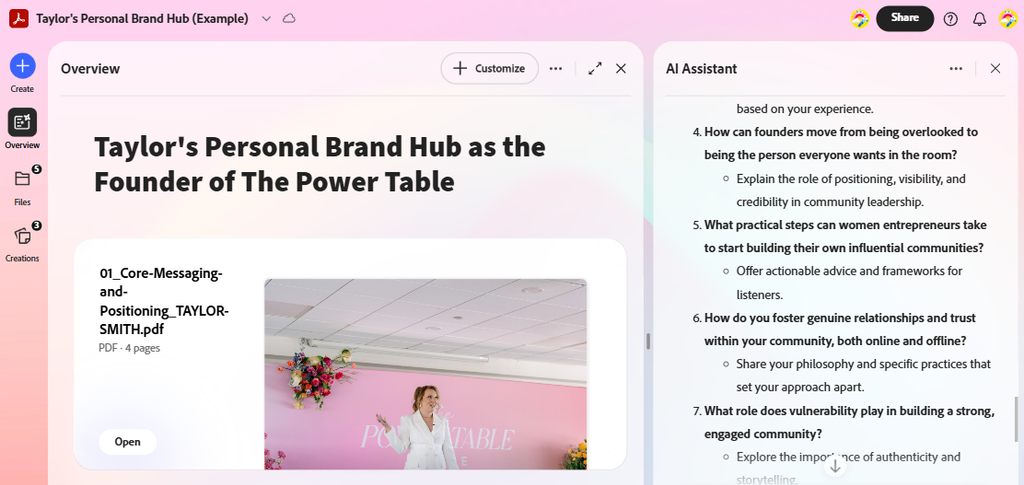
SCREENSHOT OF TAYLOR’S PERSONAL BRAND HUB PDF SPACE
The real advantage here isn’t just storage. It’s that the hub grows with you.
As you gain more experience or step into new areas of expertise, updating the hub is as simple as adding a new document, rather than rebuilding a static file from scratch every time something changes.
If you’re working with a team, that same hub becomes the shared reference point everyone pulls from when they’re creating content or building new assets on your behalf, so nobody’s guessing at your voice or working from an outdated bio.
The AI Assistant adds another layer here. You can ask it for fresh ideas about your next move, whether that’s stepping further into visibility, expanding into a new offer, or pushing into a market you haven’t touched yet. Because it’s working from everything already inside your hub, its suggestions are grounded in your actual history and materials, not generic advice pulled from nowhere. It effectively becomes a planning partner for mapping out your next quarter, built entirely on the documents you’ve already gathered.
Read more here.
Case Study 2: Live Event Templates & Workshop PDF Space at Power Table LIVE 2026
The second case study moves out of the personal brand space and into live events, and it uses a companion tool worth knowing about: Adobe Express.
At Power Table LIVE 2026, we built a set of templates for attendees to use freely during the event, including a collage template and a reel template, both fully customizable so each attendee could adapt them to fit her own brand.
COLLAGE TEMPLATE REEL TEMPLATE
We also ran a live content workshop at the event where attendees got hands on with these templates in real time, building content on the spot instead of taking a tutorial home to figure out later.
Live, at the event, attendees only needed to scan a QR code and access the Workshop PDF Space we created with the templates but additional resources like content hooks and the slides from the workshop. We also created a trained AI Assistant inside this particular PDF space to help attendees create their content hooks.
SCREENSHOT OF PTL 2026 LIVE WORKSHOP PDF SPACE
The workshop ended up showing something bigger than the templates themselves. Every resource attendees needed for that session, the templates, the instructions, any reference material we pulled together, lived inside that same PDF Space.
Nobody had to dig through a Google Drive folder or hunt for a link buried in an email.
It was all right there, in one easy place, the moment they needed it.
Case Study 3: Contracts, Agreements, and Documents
The third case study brings things back to something every business owner deals with constantly: contracts and agreements.
PDF Spaces work well as a shared hub for exactly this kind of document.
Instead of a constant back and forth over email trying to clarify a single clause, whoever’s reviewing the agreement can simply ask the AI Assistant what a particular section means, and get an answer immediately.
One real example: a proposal we built in Acrobat for our partnership with the Kirstyn J Allen Agency for the upcoming Power Table LIVE 2027. Rather than a static document requiring a follow up call to walk through every section, the scope and deliverables lived in a space either party could reference and ask questions about directly.
SCREENSHOT OF KIRSTYN J ALLEN AGENCY SPONSORSHIP PDF SPACE
For a coach who signs new client agreements regularly, this matters more than it might seem.
A prospective client who has to email you three separate times just to understand what she’s agreeing to is a client experiencing friction before she’s even become a client. A space where she can get an instant, accurate answer removes that friction entirely.
The pattern across all three
Look at these three cases side by side and a pattern emerges.
→ A personal brand hub
→ A set of live event templates
→ A shared contract space
These would typically require three entirely separate tools. A CMS or file storage system for the brand hub. A design tool for the templates. A contract platform or a shared drive for the agreements.
Acrobat’s PDF Spaces has handled all three inside one platform, with AI Assistant doing meaningful work in each case rather than sitting there as an unused feature.
There’s no jumping between platforms, no separate logins to manage, and no retraining a team every time a new tool gets introduced for a new purpose. Everything stays in one place, and that consolidation is worth more than it looks like on paper. It’s less time spent managing tools and more time spent actually running the business those tools are supposed to support.
It’s also worth noting that these three cases aren’t the ceiling either.
A brand hub, an event workshop, and a set of contracts happen to be the three that came up for us this year, but the underlying capability, an AI assistant working across everything you upload, applies just as easily to onboarding materials, internal training documents, travel or event plans, financial planning, content organization, or a client facing resource library.
The specific use case changes. The core value, one place to ask a question and get an answer grounded in your own documents, doesn’t.
Why this matters for business coaches specifically
If you’re a business coach, chances are you’re already stretched across more tools than you’d like to admit.
A CRM for clients, a course platform for your programs, a design tool for content, a separate system for contracts, and an inbox trying to hold all of it together…
The list doesn’t end.
Every additional tool is one more login, one more thing to maintain, and one more place information can get lost or go stale.
PDF Spaces offers a different model. Instead of adding another single purpose tool to the stack, it consolidates several jobs into one space that stays current as your business evolves.
Your brand materials, your event assets, client action plans or call summaries, and your contracts can all live inside the same ecosystem, referenced and updated without needing to remember which platform holds which piece.
For a coach whose business runs on her personal brand and her client relationships, that kind of consolidation is part of what keeps the client experience consistent, since fewer tools breaking down between different systems means fewer places for something to fall through the cracks.
If you want to see this idea applied more specifically to running events, our earlier piece on hosting your first or next event walks through how PDF Spaces functioned as our full event guide hub for attendees, which is where this whole thread started.
The bottom line
PDF Spaces has become the tool that keeps proving itself here at The Power Table. Every time we think we’ve used it for what it’s meant to do, another use case shows up that fits just as naturally.
We’ve always believed in getting the most out of the tools already in front of us before reaching for something new.
A tool that quietly does the bulk of the organizing, referencing, and follow up work for your team gives everyone more room to focus on the parts of the business that actually need a human behind them. That’s the entire point of choosing the right system in the first place, and that’s a long-term win for your business.
Try PDF Spaces today!